In this tutorial, I’ll walk you through my personal journey of setting up and mastering Hermes Agent. Whether you are looking to automate complex workflows or just want a powerful AI assistant that can actually do things on your system, Hermes is a game-changer.
Here is how I went from a “GPU not found” headache to a multi-platform research powerhouse.
Phase 1: The Initial Setup
I started by downloading the Hermes Desktop application. It will download an executable file which makes the setup simple and it starts you out with a test trial of their cloud AI but I was not planning on staying with a cloud model since I personally would rather run it locally. Running it locally means I can more freely use my data without worrying too much about the privacy policies of the platforms I am using.
TIP
Use the built-in model downloader first to get a feel for how Hermes handles different model architectures before diving into custom configurations. Although if you have issues with speed I will cover how I overcame that late in this article.
Phase 2: Overcoming the Hardware Bottleneck
While testing the initial models, I realized that there was a big speed issue with even very small models running at an absolute snails pace. If this is happening to you as well open up the task manager and take a look to see if your dedicated GPU is being used or not.
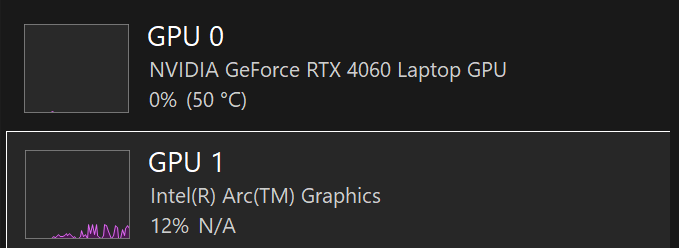 After looking at my task manager I saw that my 4060 GPU was not being used at all which is a large cause for the issues.
The Solution: Ollama & Loopback
I installed Ollama, which is an open-source tool that allows you to run LLMs locally and gives you better control over the models. By using Ollama, I could host the models myself and point Hermes toward a loopback address (127.0.0.1).
Phase 3: Choosing the Right “Brain”
Not every task requires the same amount of “thinking.” My GPU has 8GB of VRAM so I was looking for models that would fit on my GPU without issue. I was seeing online people typically recommend 0.6 GB of VRAM per 1B (billion) parameters. After doing some research, I settled on the Gemma 4 family of models. Depending on the task, I swap between two specific versions:
- Gemma4:12B: My choice for Deep Thinking. With 12 billion parameters it will be able to handle more complex tasks and able to “think” a little bit deeper and is close to the max of what my VRAM can handle.
- Gemma4:E4B: My choice for Smaller Problems. A lighter model which I can use for simple questions that do not require the same depth.
Tip
What does “E4B” mean? The “E” stands for Effective. These are “Edge models” designed to provide high-quality performance while being optimized for speed and lower hardware requirements. It’s the perfect balance of quick responses and smart outputs.
WARNING
Warning: While E4B is much faster, it may struggle with highly intricate logic compared to the 12B version. Always start with E4B for simple tasks and “scale up” to 12B if the agent gets stuck.
Phase 4: Real-World Success (The Used Car Project)
The true test of any agent is its ability to produce real-world results. I put Hermes to work on a massive research project: analyzing used car prices in my local area. It outputted all of its research and even included a table which surprised me.
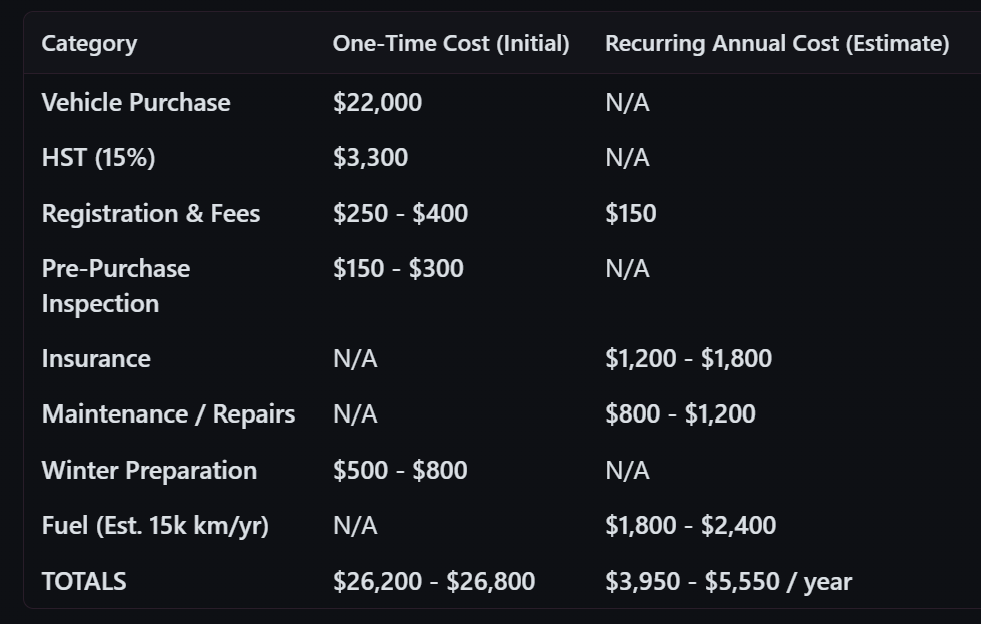
I tasked Hermes with gathering, comparing, and analyzing listings and it used its tools to actually go out and do research. The results were impressive saving me hours of manual browsing and stress. I had been doing some manual searching before running this query and I was happy to see the numbers were quite comparable to what I had found from using spreadsheets and research manually which took quite a bit of manual labor and Hermes was able to achieve this within 10 minutes.
Phase 5: Going Remote with Discord
Finally, I didn’t want to be tied to my desk to use my research agent. I integrated Hermes with a Discord bot. This allowed me to send commands, check research status, and interact with my local setup from anywhere in the world via Discord.
Summary of the Workflow
| Step | Tool/Model | Purpose |
|---|---|---|
| Hosting | Ollama | Local model management & GPU bypass |
| Connection | Loopback Address | Connecting Hermes to local Ollama instance |
| Logic | Gemma4:12B | Complex reasoning and “Deep Thinking” |
| Speed | Gemma4:E4B | Fast responses for “Effective” smaller tasks |
| Access | Discord Bot | Remote interaction and roaming access |
Conclusion
If you want to get started with LLMs I would highly recommend Hermes. It makes setting everything up simple and gives you some amazing benefits with its library of addons and smart memory. The growing memory will help it learn about you and your unique ways of solving problems. Using Ollama to host the model and using Hermes as a harness to fully unlock its power has really got me interested in what is possible with LLMs on local machines.